In the article, I share my 13-step content refresh framework I have developed while updating dozens of blog posts over the last few years.
You will learn how to identify articles that need refreshing, diagnose gaps in your content, and what exactly to update to add value to your pieces and improve their search performance.
Let’s dive right in!
TL;DR: My content refresh framework overview
Click any step to expand the detail.
Audit your content
AuditIdentify and prioritize content to refresh based on your goals and their potential.
Look for articles losing rankings, articles affected by recent product updates, and anything that hasn’t been touched in 12 months. For large blogs, score them by funnel stage, conversions, striking-distance rankings, search volume, backlinks, and past performance.
Analyze SERPs and search intent
ResearchCheck the current search results to understand what type of content is ranking and if the user’s intent for the keyword has changed.
Search the keyword in incognito. Note the dominant format (how-to, listicle, comparison, definition). If intent has shifted, reformat the article to match.
Look for content gaps
Gap AnalysisCompare your article to top competitors and research user questions on sites like Reddit to see what information you’re missing.
Feed competing articles to AI and extract every question they answer. Pull threads from Reddit and questions from AlsoAsked, Answer the Public, and your SEO tool. Cross-reference against your draft to find the gaps.
Refresh examples, information, and data
FactsA key part of the refresh is replacing old statistics, fixing inaccuracies, and adding fresh, relevant examples and case studies.
Avoid citing studies older than two years. Always link to the original source, not a secondary article that referenced it. Embed sources in the sentence with the author’s credentials so LLMs can lift the quote directly.
Update visuals and media
VisualsReplace outdated screenshots, add new high-quality images or videos, and optimize all media files with alt text for accessibility and SEO.
Swap old screenshots for current UI. Add custom graphics to break up walls of text. Embed videos to boost time on page. Compress images (.webp is the best compromise between size, quality, and compatibility).
Add new keywords and semantic terms
KeywordsAs you add new sections, naturally include relevant new keywords and related terms to make your SEO content more comprehensive.
It’s not about keyword stuffing — it’s about covering the topic comprehensively. Check related keywords in Ahrefs and optimize against the recommended semantic terms in NeuronWriter, Surfer, or Clearscope.
Improve flow and formatting
ReadabilityBreak up long paragraphs, use bullet points, and add clear headings to improve readability and create more effective content for users.
Short sentences. Tables in HTML, not graphics. Descriptive headers. BLUF every section. Avoid jargon — but don’t overexplain either, that’s patronizing.
Tweak the introduction
IntroUpdate the intro to match the refreshed content, align with the current search intent, and add E-E-A-T signals (like your credentials) to build trust.
Check the value promise still reflects the article body. Mention new sections and remove old ones. Embed your credentials — readers already know they’re interested in the topic; they just don’t know why they should read yours.
Edit the conclusion and update CTAs
CTAsRewrite the conclusion to summarize the new key takeaways and ensure the call-to-action is relevant to the reader’s intent.
If the query has shifted commercial, the CTA needs to reflect that (“Start your free trial”). If it’s informational, guide them to more resources. Use action words, address the reader directly, keep it to one sentence, and never sound salesy.
Rewrite the title
TitleCraft a new title that accurately reflects the updated content, signals freshness, and is compelling enough to click on in search results.
55–60 characters (roughly 600px) to avoid Google truncation. Primary keyword near the beginning. Emotional language and power words. Brackets or parentheses can lift CTR by over 38%. Signal freshness with the current year.
Adjust internal and external linking
LinksFix any broken links and improve your internal linking by adding new links to relevant pages on your site, helping to distribute authority.
Keep a spreadsheet of the client’s blog URLs so you can find relevant internal targets fast. Open external links in a new tab to keep readers on the page. Follow the client’s guidance on nofollow.
Update metadata and on-page SEO
MetadataRewrite the meta description to summarize the updated article and update any schema markup.
Keep the meta description under 155 characters, include the primary keyword, and make it persuasive. Add FAQ schema for Q&A sections and How-To schema for guides. Double-check alt text on every image.
Refresh the “last modified” date
FreshnessChange the “last modified” or “last updated” date on the page to show both users and search engines that the content is current.
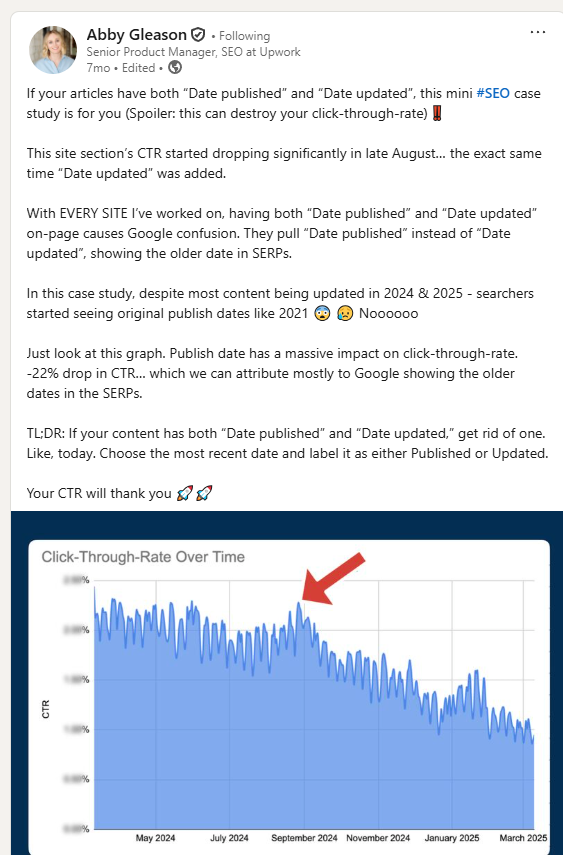
Update the dateModified in your schema markup too. Watch out: if you display both the publication and last update dates and they differ, Google can pick the wrong one and hurt your CTR.

These content refresh strategies help keep your older content relevant, boost its SEO performance, and increase visibility in AI search.
Step 1: Audit your content to identify articles to refresh
We need to refresh content for three main reasons:
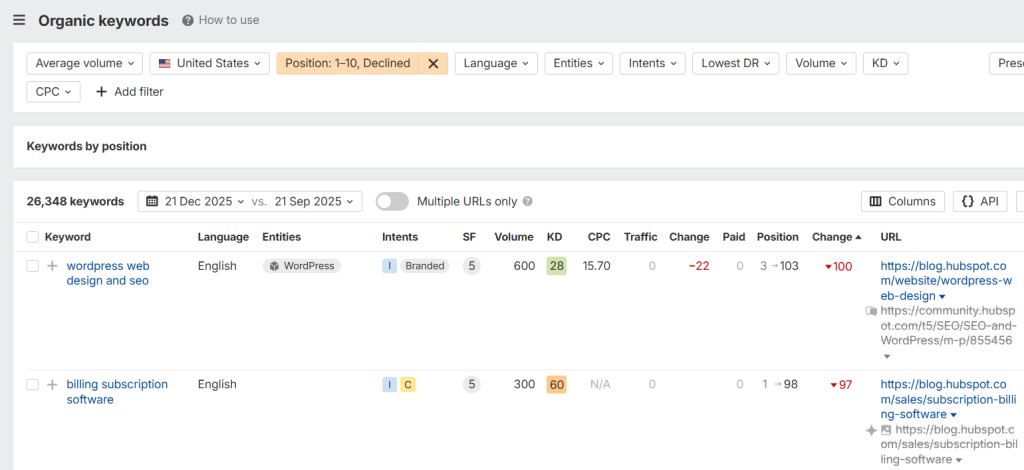
1. Your content is losing rankings: If the page is sliding down the SERP for its primary keywords, it’s a sign it needs an update. You can easily find it in an SEO tool, like Ahrefs.
Traffic vs rankings
Websites across the board have been losing traffic throughout 2025 — because of AI Overviews, not because competitors were beating them. In this context, keyword rankings are a more reliable metric when assessing content decay.
However, potential traffic is an important metric when prioritizing blogs to update.
3. You’ve updated your product: When you launch (or sunset) features, articles covering the specific aspect of functionality will need an update. The same if your competitors have updated their products.
4. You haven’t updated your content for 12 months: Even if your content is still performing well, the odds are that a lot has changed in your space over the last year. Your ultimate guide may still be the most comprehensive resource on the topic out there, but it may not be of much use to the readers, as the technology has moved on.
On paper, the above criteria are straightforward. But there are three main challenges with implementing them: identifying content update opportunities in a large blog, tracking competitors, and prioritization.
How to find articles to update in a large blog
Imagine you’ve just released a new feature. Like heatmaps or session recordings.
Now, you need to update all relevant blogs about analytics so they cover the full spectrum of features your product offers. And all articles about relevant use cases, like finding friction in the user journey.
When you have a large content library, finding all relevant pieces could be tricky.
I’ve found two ways to solve this:
- Adding detailed tags to the pieces you publish, either in your CMS and/or whatever platform you use to keep track of your content (Notion, Airtable, ClickUp, and so on). Like “analytics”, or “user journey friction”. So you can easily filter the relevant pieces.
- Saving your content in a knowledge base and using LLMs to analyze it for relevant updates.
How to track competitor updates
When you update your product, you know you need to update the related content.
But how do you know that your competitors have updated theirs? So you can keep your listicles, reviews, and comparison articles relevant?
With 2-3 of them, you can check the websites manually. But it isn’t feasible if you cover 20-30 alternatives across multiple articles.
That’s where AI agents can help. I’ve designed three workflows that tackle the issue:
- Competitor research workflow: It collects and analyzes competitor information from multiple sources and compiles a comprehensive report, saved in the knowledge base.
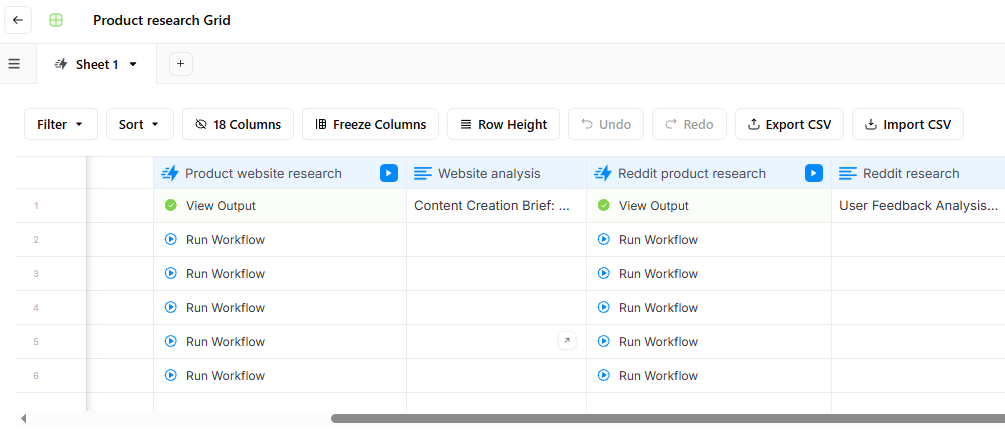
- Competitor update workflow: It cross-references the information in existing articles with the knowledge base and identifies sections that are out-of-date and need refreshing. It can also implement the changes for you or create an update brief for your writers.
How to prioritize blog posts to refresh
If you have 20-30 articles in your blog post, you can update them all regularly. Say every 30-60 days.
If you have 200-300? It may not be feasible to do them all in one go because it’s expensive even if you do it with AI tools like AirOps.
Here are a few factors I’d consider when prioritizing which blogs to start with:
- Funnel stage: BOFU content that captures high-intent traffic, shows in AI search, and converts needs more frequent updates than TOFU pieces (they get out of date quicker, too)
- Conversions: Articles that get more demo bookings or free trials are high-priority. Or those with low conversions but high traffic.
- Current rankings: Pages in top 4-10 — the so-called striking distance — should be fairly easy to bump up into the top 3. And pages in top 11-20 up to the first page.
- Keyword search volume: Pages targeting keywords with higher search volumes should go first.
- Backlink profile: A page with strong backlinks should be easier to boost with an update. Unless competitors have even stronger profiles.
- Past performance: If a page has ranked high and brought lots of traffic before, the odds are that an update can restore it to its past glory.
- Last update date: Articles updated 9-18 months ago take priority over those updated in the last three months.
With so many variables, choosing blog posts to update ain’t easy. Do you prioritize a TOFU blog post in #5, which has slipped from #2 and has earned you dozens of backlinks over the last couple of years? Or a fairly new BOFU one in #13 that’s targeting a relatively low-volume keyword?
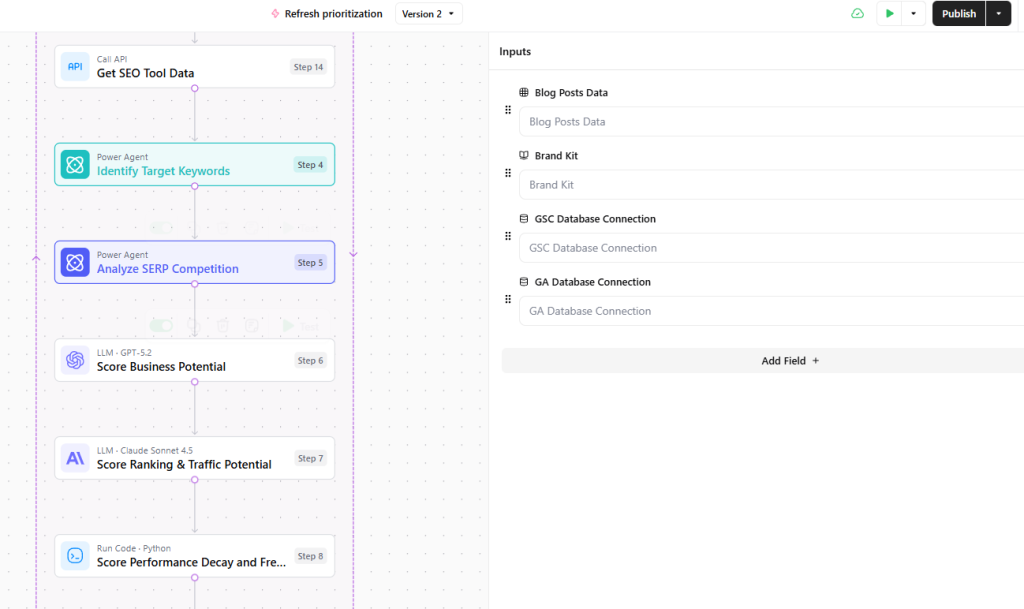
To simplify it, I’ve built an AI workflow in AirOps that simplifies it.
It pulls the information about their article performance from Google Search Console, Google Analytics, and Data for SEO, and scores them on multiple criteria.
The criteria are weighted, so blogs with high business potential get higher scores than other blogs with similar ranking or traffic potential, and so on. You can adjust the weighting to your priorities.
Step 2: Analyze SERPs and search intent
Analyzing the top-performing articles in search results — and the reader’s intent they satisfy — is arguably the most critical step in the entire content refresh process.
Search intent can and does change over time. If you don’t address the change in your refresh, it will fail to satisfy current reader needs.
Here’s how I analyze search intent:
- Search for your target keyword in an incognito window
- Analyze the type of content in the SERP. Is it “how-to” guides, list-based articles (“listicles”), product comparison pages, or informational definitions? For instance, the keyword “content refresh” has informational intent, and most ranking articles in the top 10 are how-to guides.
- Decide if the intent is the same or has changed. For example, has a query that was once purely informational (“what is CRM”) now shifted towards the commercial end (“best CRM software”)?
- If there’s a change, reformat the article to match this dominant content type.
Step 3: Look for content gaps
Finding content gaps between your article and the ranking allows you to fully address readers’ needs. Even if the search intent remains the same, your content may simply miss aspects that readers find relevant.
This is your chance to make your content stand out and outrank your competitors — by answering reader questions that they fail to answer.
Here’s a quick AI workflow to do it:
- Feed the competing articles to your AI assistant and ask it to extract all questions they answer — directly or indirectly.
- Search Reddit for recent threads on the topic. Export them as PDFs and ask the AI to extract all the questions the readers ask.
- In AlsoAsked, Answer the Public, and/or your SEO tool, look up questions related to your keyword. Here’s what it looks like for “content refresh”. Download the results and share them with your AI chatbot.
4. Ask your AI to create a comprehensive list of all the questions from across the three and cross-reference them with the questions answered in the article you’re refreshing. Prompt it to create a list of questions your content needs to answer to satisfy the reader.
Step 4: Update information, examples, and data
Ensuring all information is current and correct is the next step.
This means:
- Refreshing outdated data (Replace old statistics with the most recent figures. I aim not to cite studies older than two years — whenever possible.)
- Citing sources correctly (Always cite the original source of the data, not a secondary article that referenced it.)
- Replacing dated examples and case studies with fresh, relevant ones.
- Fixing inaccuracies (Correct any factual errors, for example, in pricing details or features available).
Accurate and recent data help gain reader trust and keep them on the page. We’ve all been cheated by articles with 2025 citing 2015 data, so we know what a bounce-trigger this is.
Pro tip: When citing sources, embed them in the sentence and add their credentials to signal authority and expertise. Write in standalone sentences that LLMs can lift directly.
For example, “A 2025 study by Margarita Loktionova, a Content Marketing Lead at Semrush, and Kevin Indig, SEO Advisor and founder of Growth Demo, found that nofollow links are as valuable for AI visibility as dofollow backlinks.”
Step 5: Update visuals and media
Just like updating information, upgrading multimedia elements is important for user trust — out-of-date images are even easier to spot than old data.
More importantly, quality visuals help convey complex information and increase reader engagement.
- Replace old screenshots: Add screenshots that show the new product UI, pricing, or features.
- Add new or refresh visuals: If the original post is a wall of text, add new, high-quality images, charts, or custom graphics to break up the content.
- Embed video: Embedding relevant, high-quality videos can also increase time on page.
- Optimize images: Use descriptive filenames and write descriptive, accurate alt text that includes the target keyword where it fits naturally. Compress images for faster loading (the .webp format seems to be the best compromise between size, quality, and compatibility.)
Pro tip: I use Napkin AI to create custom visual prototypes. It’s easier to explain to the graphic designer what exactly I mean.
Step 6: Add new keywords and semantic terms
As you’re adding new sections and updating the information, you’re likely to use new, relevant keywords naturally.
However, I like to have a closer look at the keywords that competing articles rank for to ensure I’ve included them.
It’s not about keyword stuffing at all costs. It’s about ensuring I cover the topic comprehensively and use related terms.
Two things I do here:
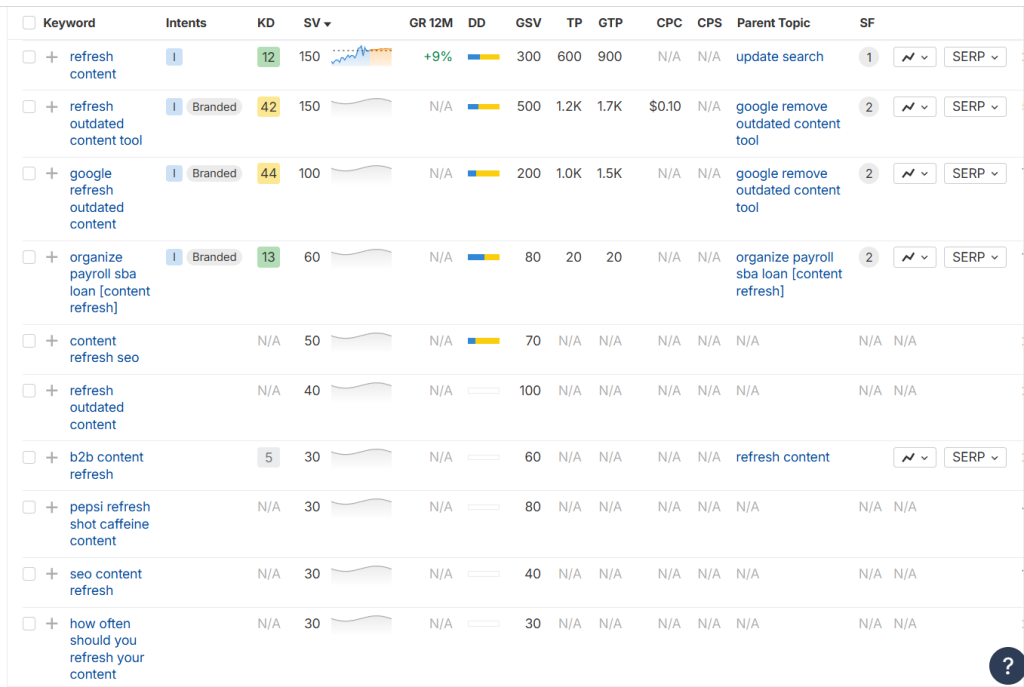
– In Ahrefs, I check the keywords related to the primary keyword and look for relevant ones to include in the article.
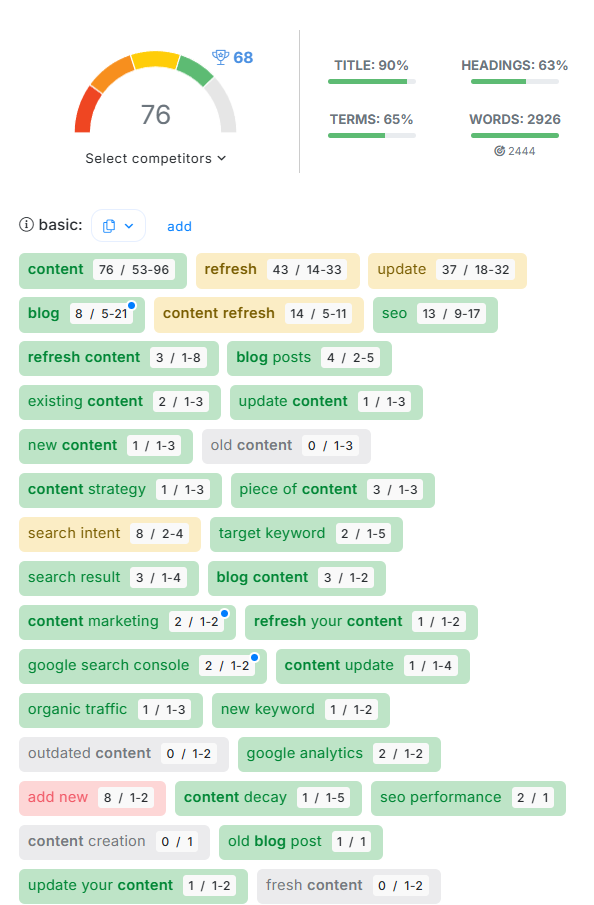
- I optimize the article in NeuronWriter/Surfer/Clearscope (whichever the client uses) and include the recommended semantic terms.
Step 7: Improve the flow and formatting for better readability
Greater readability makes text easier to skim/scan, digest, and consequently, offers a better user experience. And it improves organic and AI search performance.
To improve your text readability,
- Break up long paragraphs into bite-sized sections. Use shorter sentences and paragraphs to make them easier to understand (and retrieve by AI).
- Use bullet points and numbered lists.
- Add tables summarizing the key article or section takeaways (created in HTML, not a graphic design tool)
- Use descriptive headers so readers can easily understand the main ideas and find relevant sections.
- Start each section with the bottom line up front (BLUF)
- Avoid jargon to make the article accessible to non-technical readers (but don’t overexplain, as this may sound patronizing and show you don’t understand your audience)
Step 8: Tweak the introduction
Once I update the main article body, I move on to the introduction to make sure it aligns with the newly refreshed content and the current search intent.
At the very least, I check if the value promise accurately reflects the new article content. If I add a new key section to the article, I make sure I mention the benefits the section brings to the reader. If I remove a section, I remove any mentions of it.
Another thing I often do is embed EEAT signals, like my credentials. Remember how I mentioned my experience with content updates in the intro to this article? That’s what I’m talking about.
Showing the reader why I’m the right person to write the article is an effective way to draw them in. They already know they’re interested in the topic (they searched for it). They just aren’t sure why they should read yours yet.
Step 9: Edit the conclusion and update CTAs
Updating the conclusion means two main things for me:
- Ensuring it summarizes and synthesizes the key arguments I want the reader to take away from the article
- Optimizing the CTAs.
The latter is particularly important when you’re updating a page that fails to convert (Priority 3 from Step 1).
Or when the search intent has changed.
For example, if the article is lower down the funnel now, the CTA must reflect the commercial nature of the query (“Start your free trial now”). On the other hand, if the article is more informational and the reader isn’t ready to purchase just yet, it should guide them to more resources, case studies, or testimonials (like “Why Zoom”).
A good CTA:
- Uses action words
- Addresses the reader directly (imperative)
- Is short (one sentence for a blog post)
- Naturally leads from the previous point and prompts the reader to act
- Is not salesy
Step 10. Rewrite the title
When the article copy is ready, I rewrite the headline/title tag to accurately reflect the updated content and persuade the searcher to click on it in the SERP.
Successful blog titles:
- Communicate the article’s value
- Match the reader’s intent
- Are 55-60 characters long (Roughly 600px to avoid Google truncating it in search results)
- Include emotional language and power words (e.g., boost)
- Include brackets or parentheses (which can increase the click-through rate by over 38%)
- Contain the primary keyword, preferably near the beginning.
- Signal freshness (e.g., “The Best CRM Software [2025 Guide]”)

Step 11: Adjust internal and external linking
Internal linking is a powerful — and often underutilized — tool for distributing authority throughout your site, adding value to your content, and helping readers find relevant resources.
When I start working with a client, I download a spreadsheet with all their blog URLs from Ahrefs so I can quickly find relevant articles.
As I verify and update the information in the article, I take care of broken external links. Normally, there aren’t many of these because the SEOs and content managers I work with monitor their websites for broken links regularly.
Pro tip: Whether you’re adding internal and external links, set them to open in a new tab. This keeps the reader on the page. For external links, follow your clients’ guidance. For example, your client may use only nofollow links.
Step 12: Update metadata and on-page SEO
Most on-page search engine optimization happens automatically as I write the article.
There are just a few things to do:
- Rewrite the meta description to provide a concise, persuasive summary of the updated page. Make sure it aligns with search intent, includes the primary keyword, and entices the user to click. Keep it under 155 characters. The odds are that Google will rewrite it anyway, but if you don’t optimize it, you give up control entirely.
- Update schema markup: Add FAQ schema for your new Q&A sections or How-To schema for guides (normally SEOs, not writers, do it, or the website has plugins that generate it automatically.)
- Add alt text if you didn’t when embedding images.
- Make sure the score in the content optimization tool meets the client’s standards.
Step 13: Refresh the “last modified” date
To change the date or not? Does it even matter?
It does. Readers pay attention to the publication/update date as an indicator of how current the article is. An old date can hit your CTRs.
So it’s good practice to display the Last modified date on the page and update it in the schema markup (“dateModified”).
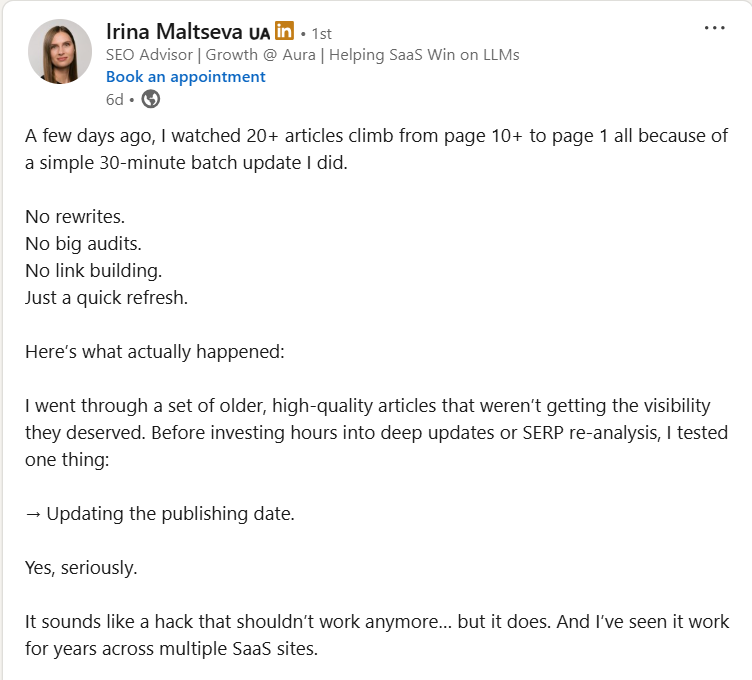
Changing your publication date can also boost your rankings, as shown by Irina Maltseva in her recent LinkedIn post:
Here’s a thing to watch out for: if you display both the publication and last update date on your page and they are different, Google can show the wrong date. And ruin your CTRs, as Abby Gleason learned the hard way earlier this year.
Adapt your content update process
Refreshing old content isn’t as sexy as new content creation, but it’s one of the most effective content marketing and SEO strategies.
This framework helps you transform old content into a high-performing asset. It covers every aspect of the process necessary to ensure that the piece of content remains at the top of the first page of search results, gets cited in AI search, and most importantly, keeps satisfying readers’ needs.
As every team works differently, not all of the steps will apply to their workflow. For instance, your content manager may conduct the content audit and give you a detailed brief highlighting the key changes you need to make to the article content or structure, and your job is to write it up.
So the next step for you is to analyze your current workflow and adapt the above process accordingly.
If you’re a content manager and happen to be reading this article and need a writer to help you breathe new life into your content, get in touch!
Content refresh FAQs
To finish, let me answer a few frequently asked questions about content refreshes.
Why is refreshing old blog posts important?
Refreshing existing content is a core part of effective content marketing — as important as creating new content — because it helps you maintain and improve your organic search rankings. Search engines, like Google, favor fresh content because it offers a better user experience.
LLMs also prefer to pull information from up-to-date content. Airops data from earlier this year (2025) shows that 35% of all sources cited by ChatGPT were updated within the last 3 months, and 70% of them within the last year.
Recently Updated Pages Earn The Most Citations
Over 70% of the pages cited by ChatGPT had been updated within the past 12 months, indicating that recent content updates play a critical role in sustaining AI search visibility.
Update Frequency Of Pages Cited
Source: AirOps, 2026 State of AI Search report
Most importantly, up-to-date content is more valuable for readers. It gives them the most recent information available and can make you the go-to source in your niche.
On the flipside, outdated content can hurt your reputation and authority in the eyes of potential customers.
How often should I update my blog content?
A general guideline is to audit your top-performing posts every 3-12 months.
This depends on your industry, product or service updates, and competitor activity. For instance, one of my clients in the SEO space updates their content monthly because of the constant AI search developments.
Another factor to consider is the kind of content. Siege Media has discovered that listicles (“best x software”) and articles targeting “rates” keywords (e.g., “mortgage rates”) needed more frequent updates than how-to guides or “calculator” pages.
What’s the difference between a content refresh and a rewrite?
A content refresh focuses on improving an existing post by updating information, visuals, formatting, and SEO.
A rewrite involves fundamentally overhauling the entire piece, often because the original angle is completely misaligned with current search intent.
This distinction can have implications for the content budget as writers charge different rates for refreshes and rewrites (rewrites normally count as new pieces).
Do refreshed posts improve SEO?
Yes, search engines prefer fresh, accurate, and comprehensive content.
Updates that include new data, address content gaps, and align with search intent rank higher. They increase user engagement (longer dwell times) and have higher click-through rates, which affects rankings.
What are the best software tools for content refreshes?
Various tools can aid you at different stages of the content refresh process.
- Google Analytics and Google Search Console offer the most reliable traffic data, so they can help you spot content decay and track post-refresh SEO performance.
- Animalz Revive is perfect for automatically detecting content to refresh based on GSC data.
- Ahrefs and Semrush are excellent choices for discovering the “striking distance” keywords and finding keyword gaps.
- SurferSEO is my top choice for grading existing content against top-ranking pages for topical comprehensiveness and identifying missing terms to include in the content update.
- Screaming Frog will help you find broken internal and external links and find internal linking opportunities.
- Hemingway Editor and Grammarly help writers improve content clarity, simplify complex sentences, and improve accuracy.
- AirOps allows teams to build AI workflows to automate every step of the content update process.
How do I scale content refreshes across a large blog?
You can scale content refreshes in a large blog with AI tools like AirOps. The platform offers an off-the-shelf template with a sequence of workflows that focus on organic and AI search optimization.
You can even trigger them automatically based on declining traffic, rankings — based on Google Search Console data — or at regular intervals (every 90 days).
Once triggered, the workflows run simultaneously for all relevant articles.
With AirOps, you can also create custom workflows to automate specific steps of the refresh process. For example, I’ve created one to prioritize blogs based on multiple criteria or update competing product information in listicles.
Alternatively, you can create refresh agents in Claude Code. This option requires a more complex initial setup to integrate all the tools that AirOps offers out of the box.
