Over the last four years, I’ve written over 600 SEO blog posts. 60+ of them rank in 1-3 spots for their primary keywords in Google search results.
In this article, I’ll walk you through my 9-step search engine optimization process and 8 high-level skills that will help you improve the SEO performance of your content, whether you’re a content writer, editor, or content manager.
9-step SEO guide for writers (execution)
Click any step to expand the detail.
Identify search intent
IntentThe SEO tool labels (informational, commercial, transactional, navigational) are too general. Look at the actual SERP.
Analyze the ranking articles’ structure, visuals, length, content, and gaps. Ask AI to extract all the questions they answer and cross-reference with People Also Asked, Answer the Public, and AlsoAsked. That’s your baseline.
Write “people-first” content
HelpfulnessGoogle’s Helpful Content Update rewards content created to benefit people, not to manipulate rankings.
Write for a specific audience, with a specific purpose, providing actionable guidance and unique insights. Not diverse topics generated in bulk to chase traffic.
Weave E-E-A-T signals into the text
AuthorityExperience, Expertise, Authoritativeness, Trustworthiness.
Speak to SMEs, ask them to verify your work, cite reputable primary sources, use the client’s internal data and case studies, state expert credentials in the text, and embed customer testimonials.
Embed keywords and semantic terms naturally
KeywordsPrimary keyword in the title tag, URL slug, H1, and first 100 words. Secondary keywords and semantic terms in H2s and H3s. The rest naturally.
Tools like Surfer, NeuronWriter, and Clearscope identify relevant terms. But a high score alone doesn’t matter — the article needs to be relevant and offer value. Keyword stuffing has been dead since 2011.
Craft clickable titles & meta descriptions
MetadataTitles: relevant keywords, under 60 characters, brackets or parentheses, optimized for emotional marketing value.
Meta descriptions: up to 155 characters, include the primary keyword, summarize the benefits, use an imperative. Google rewrites ~70% of them, but writing them is still best practice.
Make your content scannable/skimmable
ReadabilityLogical H2/H3 hierarchy, descriptive dense headers, avoid lengthy sentences, short paragraphs (1–5 sentences, 3 lines max), bullet points, numbered lists, summary tables.
Add images and media to increase engagement
MediaVisuals increase time on page, attract backlinks, make pages discoverable via visual search, and get shared on social.
Use descriptive filenames with the primary keyword (e.g., seo-for-writers-keyword-research.webp) and clear alt text. Accessible for screen readers, and helps search engines understand image content.
Add internal & external links
LinksInternal links distribute authority across the website, help users find related content, and help search engines crawl and understand your site.
External links to reputable sources demonstrate trustworthiness. Use descriptive anchor text that tells Google what the linked page is about.
Optimize for featured snippets
SnippetsLanding a featured snippet (position 0) increases visibility and traffic.
Use question-based headings, BLUF the answer in 40–50 words immediately after the heading, and use lists and tables for step-by-step instructions or comparisons. These practices also increase AI Overview visibility.

If you’d rather watch, here’s a video covering the 9 steps!
Step 1: Identify search intent
Search intent is the reason why the reader is searching for the term.
We distinguish 4 main types of intent:
- Informational (What is project management software?)
- Commercial (Best project management software)
- Transactional (buy Asana)
- Navigational (Asana login)
These are the labels you will find in your SEO tool.
These categories are very general, though. They don’t tell you much more about the content that ranks for the keyword than you can figure out from the keyword itself.
A quick look at search results for the keyword is more revealing.
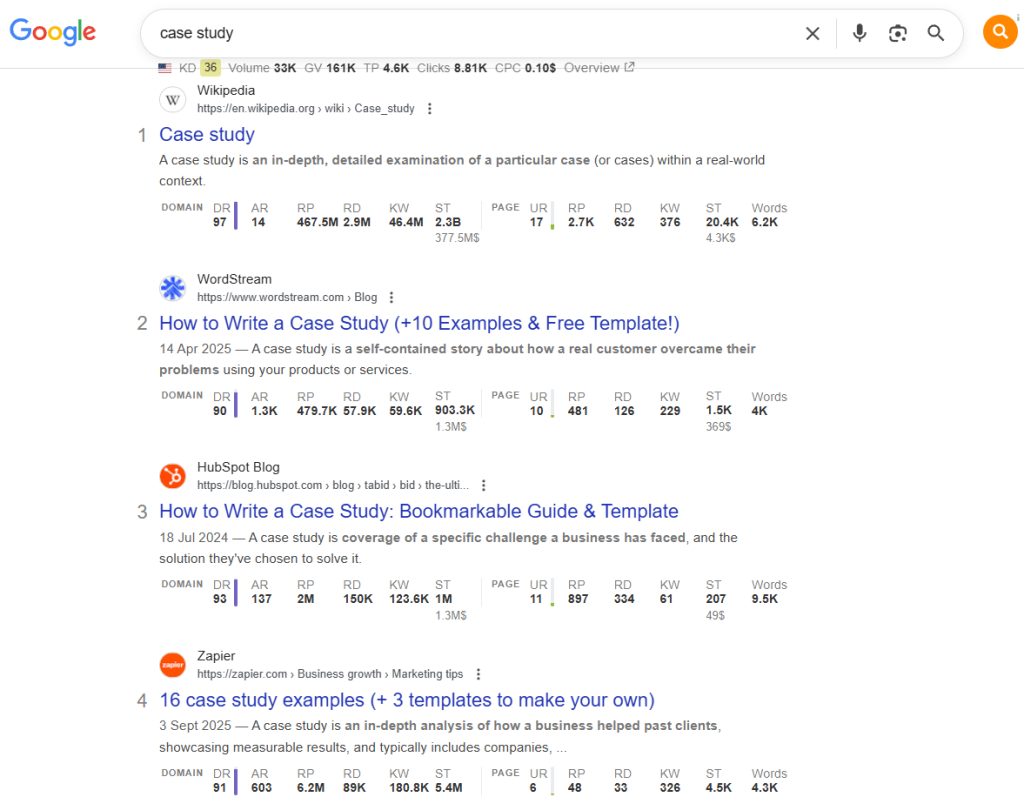
For instance, if you search for “case study,” you see that most ranking articles are how-to guides. This is the format to follow.
Don’t stop there.
Analyze the articles in terms of:
- Structure (How many H2/H3/H4s, etc?)
- Visuals (How many images and videos?)
- Length (How many words?)
- Content (What subtopics they cover, what gaps you could fill to make the content more comprehensive, what’s unique about each of them.)
Pro tip: Prompt your AI assistant to extract all questions the articles answer (directly and indirectly) and find common reader questions for the keyword via People Also Asked, Answer the Public, and/or AlsoAsked. That’s your baseline to cover.
Step 2: Write “people-first” content
To perform well in Google’s search engine rankings, write content to satisfy your audience, not the algorithms.
With the 2022 Helpful Content Update, Google started prioritizing content that provides “helpful, reliable information that’s created to benefit people, and not content that’s created to manipulate search engine rankings.”
Writing people-first content in practice means:
- Writing for a specific target audience (e.g., content marketers)
- Creating content that has a specific purpose (e.g., help them appear in search results consistently)
- Providing actionable and in-depth guidance so the reader can achieve their goal after reading the article
- Adding unique insights to the existing discussion, not just regurgitating what others have said before
In contrast, bot-first content:
- Is made primarily to attract search traffic
- Covers diverse topics without a clear focus
- Is generated in bulk, e.g., with AI
- Summarizes what others say without extra value
- Doesn’t satisfy the reader’s need, forcing them to search for more information elsewhere
- Isn’t grounded in real-life experience and expertise
Step 3: Weave E-E-A-T signals into the text
Speaking of expertise, high-performing content demonstrates Experience, Expertise, Authoritativeness, and Trustworthiness (E-E-A-T).
Let’s take this article as an example:
It’s based on my personal experience, and I use specific examples from articles I’ve written to illustrate the points I make. I have written over 600 articles, many of which rank high in SERPs (Search Engine Results Pages). Over a 100 of them were actually about SEO, so I have the necessary expertise to write about the topic in an authoritative manner that hopefully inspires trust.
But let’s face it: as writers, we don’t always have such in-depth experience of what we write about. How can we embed E-E-A-T signals in the text without it?
Here are a few ways to do it:
- Speak to internal and external subject matter experts. Ask them for examples, anecdotes, and insights. For instance, the UX designers and product team helped me a lot when I wrote about product analytics for Userpilot.
- Ask the SMEs to verify your work once it’s ready. This was the norm when I worked for Honestly.
- Provide evidence to support your claims from reputable, current, primary sources.
- Use the client’s internal data and case studies to illustrate your points. (For example, I used case studies for my Doofinder, Userpilot, and Spoke articles to demonstrate the product value).
- Provide expert credentials in the text. For example, “Jane Smith, a messaging and positioning expert with a decade of experience, points out …”
- Embed customer testimonials in the copy.
Step 4: Embed keywords and semantic terms naturally
Google uses keywords and related semantic terms to understand your content context, assess if it meets user intent, and how comprehensive the coverage is.
My process is simple:
- Place the primary keyword in the title tag, the URL slug, the H1, and within the first 100 words.
- Use secondary keywords and semantic terms (synonyms, related phrases) in H2s and H3s.
- Write the rest of the article naturally.
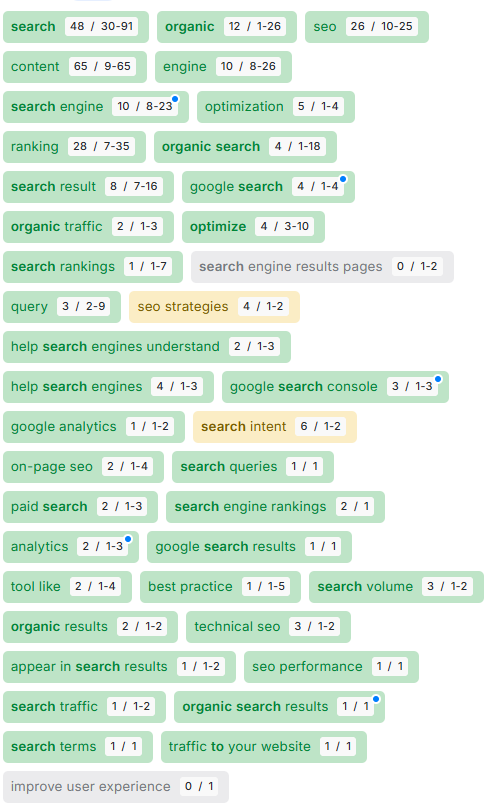
You can identify relevant terms to use in your copy with tools like Surfer or Clearscope.
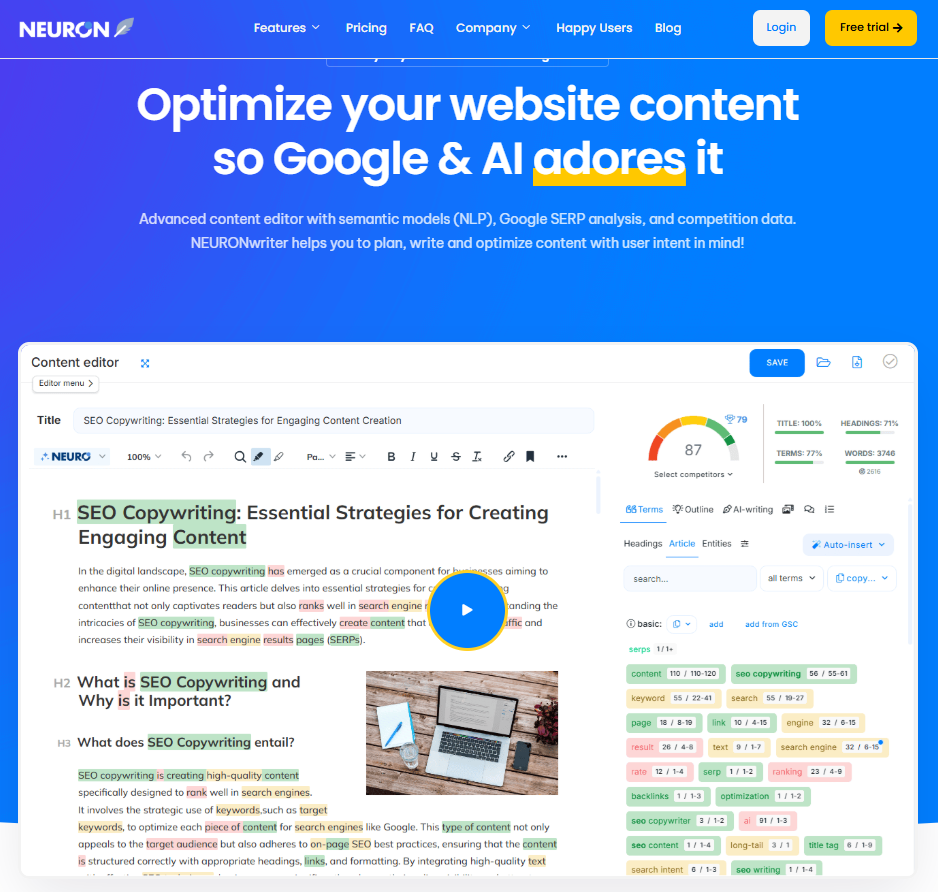
Here’s what the recommendations look like for this article in NeuronWriter:
Why did I italicize “naturally” above?
Keyword stuffing hasn’t worked since 2011 (the Panda update) — and frankly, it sounds ridiculous — so a high score in the optimization tool on its own isn’t enough to perform well. The article must be relevant and offer value.
Step 5: Craft clickable titles & meta descriptions
Your title tag and meta description can affect how many people click on your article in the search engine results pages. Which is already challenging because of AI Overviews.
What makes a clickable title?
Brian Dean, the founder of Backlinko, recommends:
- Using relevant keywords
- Starting with one of these phrases
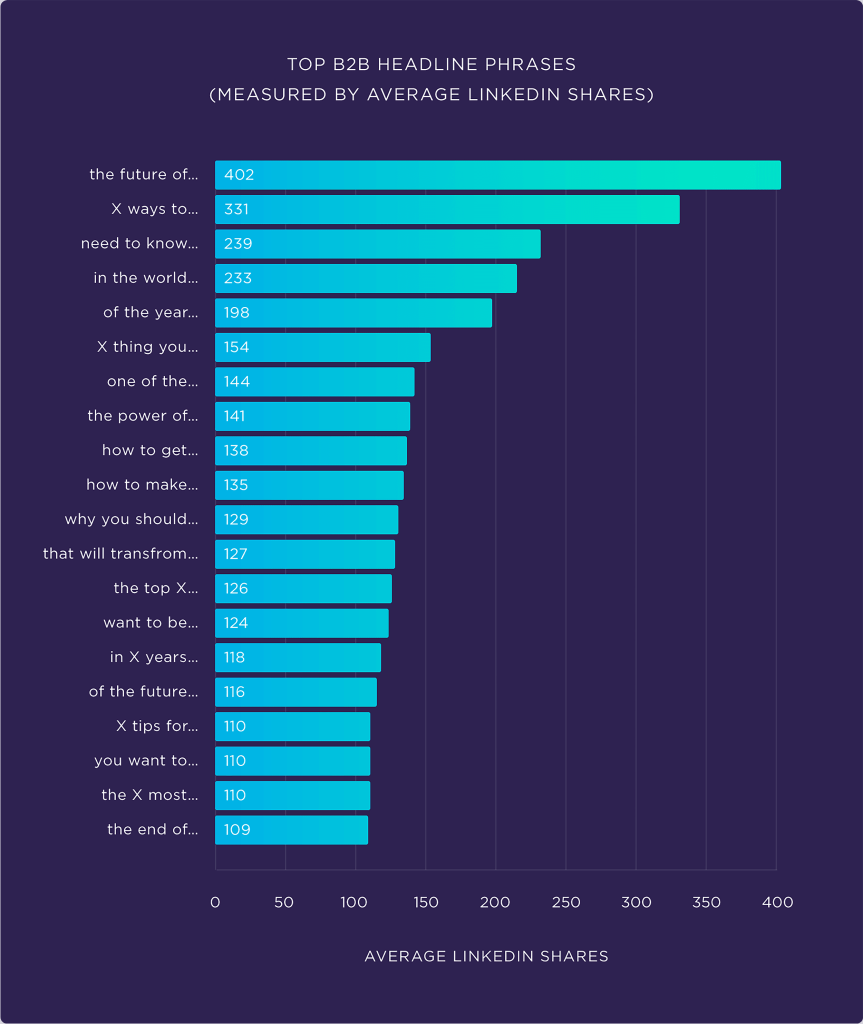
- Keeping it under 60 characters long
- Adding brackets or parentheses
- Optimizing it for emotional marketing value (EMV)
As to meta descriptions,
- Keep them up to 155 characters long
- Include the primary keyword
- Summarize the key article benefits
- Use imperative/CTA
Here’s a caveat, though.
There’s no guarantee that Google will show your meta description in SERPs. Or your title, for that matter.
According to Search Engine Land, Google rewrites about 60-70% meta descriptions and around 76% of title tags to better match search queries.
But writing them remains a Google best practice, and if you don’t, you surrender control without a fight.
Step 6: Make your content scannable/skimmable
Your webpage visitors don’t usually read the whole page. Not immediately, anyway. They skim it to get a general understanding and assess its value. Or scan it to find specific information and zero in on the particle section.
To make your piece easy to scan/skim,
- Use a logical H2/H3 header structure
- Write descriptive, dense headers that communicate the key section takeaway
- Avoid lengthy sentences
- Write in short paragraphs (1-5 sentences, 3 lines max)
- Use bullet points and numbered lists
- Add tables summarizing key details
Step 7: Add images and media to increase reader engagement
Adding visuals is another way to make your content easier to scan and skim.
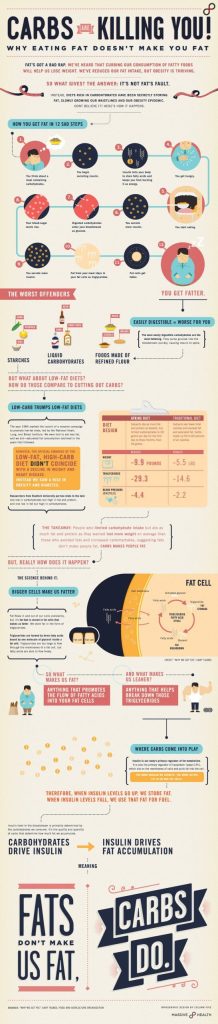
Take this Massive Health infographic as an example. You’d need a whole article to communicate all the insights it does. And it is much easier to process for the human brain than a wall of text.
There’s more:
- Visuals, especially videos, make your content more engaging and increase time on page, which signals relevance to search engines.
- Pages with visuals attract more backlinks, boosting your website’s authority.
- Images make it easier to find your page via visual search.
- Readers are more likely to share them on their socials.
When you insert an image into your blog, use descriptive filenames with the primary keyword (e.g., seo-for-writers-keyword-research.webp) and write clear, descriptive alt text. To make them accessible for visually impaired readers and help search engines understand their content.
Step 8: Add internal & external links to build context and add depth
To help readers find related materials and reference your sources, use internal and external links.
For example, in this article, I link to my homepage, other resources on my website that cover the discussed topics in more depth, and the pages on other websites I cite in the content.
Doing so improves user experience and adds value to your content. It also passes PageRank around the website and demonstrates authoritativeness and trustworthiness.
Links also help search engines crawl your website, discover new pages, and understand their content.
Pro tip: Attach the hyperlinks to anchor texts that naturally and accurately describe the content of the linked-to page. This helps Google understand the context.
Step 9: Optimize for featured snippets
Featured snippets are special result boxes with definitions, answers to searchers’ questions, lists, and tables lifted directly from a webpage.
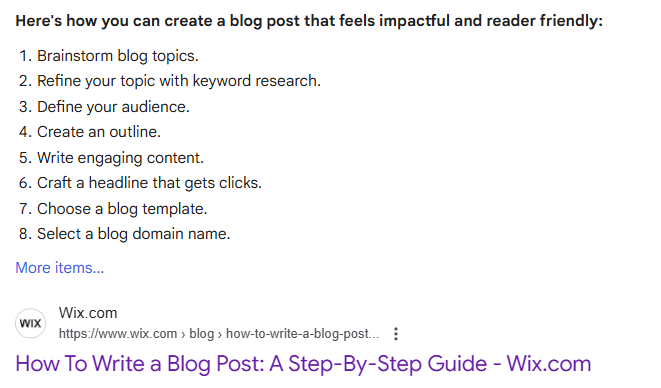
Here’s an example of the snippet for “how to write a blog post” from the Wix article. It’s an ordered list with step-by-step instructions.
Because they appear at the top of the search results page (position 0), landing a featured snippet increases your visibility and boosts traffic.
How do you optimize your articles for featured snippets?
- Use question-based headings, for example. “What are the best SEO tools for content writers?” instead of “best SEO tools for content writers”.
- BLUF (Bottom Line Up Front): Concisely answer the question, define the term, or provide the key takeaway immediately after the heading (40-50 words). Expand later.
- Use lists and tables: Google often pulls step-by-step instructions and comparisons for featured snippets.
All these practices can also increase your visibility in AI search results, including AI Overviews, which increasingly replace featured snippets.
8 high-level SEO skills to become a strategic content partner
Mastering the 9-step process above makes you a good SEO strategy executor.
Mastering these skills helps you go beyond that — it makes you a strategic partner. And makes your services more valuable and harder to replace.
The capabilities that separate SEO executors from strategic content partners.
Conduct keyword research
Identify keywords to target — balancing difficulty, search volume, traffic value, clicks per search, and intent. Niche long-tail keywords usually deliver the best ROI.
Build authority through topical clusters
Pillar pages + supporting articles, interlinked to cover the topic from every angle. Google sees your site as a reliable source and starts serving more of your content.
Add structured data with schema markup
Schema tells search engines exactly what’s on your page — and boosts your chances of appearing in rich snippets, FAQ dropdowns, and AI search results.
Identify content that earns backlinks & AI citations
Free tools, original research, ultimate guides, infographics, and list posts are link magnets. Backlinks drive rankings; brand mentions drive AI visibility.
Understand technical SEO & Core Web Vitals
Page speed, responsiveness, mobile-friendliness, crawlability, HTTPS. Your amazing content won’t rank if the site is slow, broken, or hard to crawl.
Identify content that needs refreshing
Spot declining rankings, outdated product info, and articles over a year old. Then refresh them with new data, visuals, and structural improvements.
Promote content through different channels
Social media, newsletters, direct outreach, paid ads. More eyeballs drive qualified traffic, backlink opportunities, and branded search — all indirect ranking signals.
Track performance and optimize accordingly
Monitor rankings, impressions, CTR, traffic, time on page, and conversions. Detect content decay, spot striking-distance pages, and adjust before competitors leapfrog you.
Skill 1: Conduct keyword research
Keyword research is about identifying keywords to target in your content.
Factors I consider when researching keyword opportunities include:
- Keyword difficulty: How challenging is the keyword to rank for based on the strength of the competing websites
- Search volume: How many people search for the keyword every month
- Estimated organic traffic: How many visitors it can bring to the website
- Traffic value: How much you’d have to spend on paid ads to bring the same traffic to the website
- Clicks per search: How many different search results get clicked, on average, when people search for the keyword
- Search intent: Commercial keywords are more likely to bring traffic ready to buy
Finding such details is no problem with tools like Semrush or Ahrefs.
The real challenge? Choosing a keyword that brings valuable traffic and that you can realistically rank for.
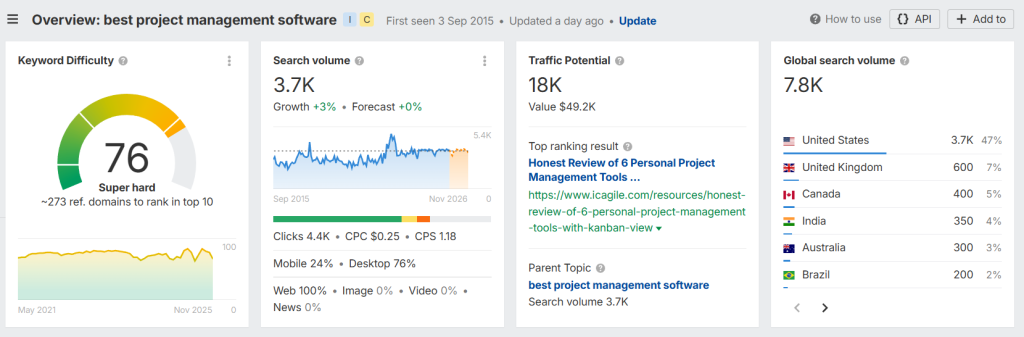
For instance, “best project management software” looks excellent on paper. Search volume of 3.7k, CPS is 1.18, and potential monthly traffic of 18k is worth $49.2k.
But the keyword is super hard to rank for. You’re competing with the likes of Microsoft and The Digital Project Manager, both high DR websites. To outrank them, you’d have to invest heavily in link-building, which might not be feasible for less established businesses.
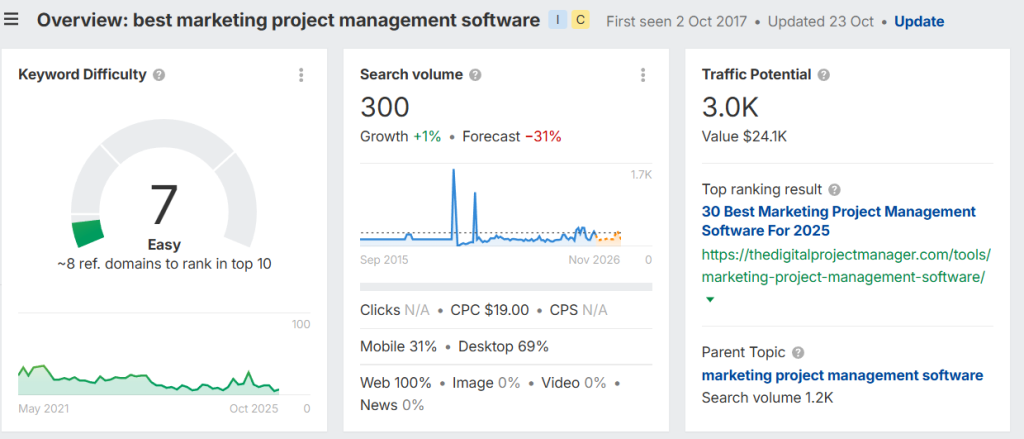
In contrast, ranking for “best marketing project management software” is easier. And the potential rewards are still substantial, including 3k traffic worth $24k.
The rule of thumb is that niche long-tail keywords tend to be easier to rank for and offer higher ROI. But as with everything, check the numbers before you commit to creating content for specific keywords.
Skill 2: Build authority through topical clusters
Creating content clusters that cover the topic exhaustively from multiple angles increases topical authority. Google sees such a website as a reliable source of information on the subject and is more likely to serve content to searchers.
In practice, this means creating a central pillar page that covers the topic broadly, like the “Ultimate Guide to Content Marketing”, and cluster posts that explore subtopics in greater depth, like:
- “How to build a content editorial calendar for your team” (Focus: Process & Organization)
- “10 KPIs to measure your content marketing ROI” (Focus: Analytics & Performance tracking)
- “A beginner’s guide to keyword research for bloggers” (Focus: SEO & Strategy)
- “How to repurpose blog posts into social media videos” (Focus: Distribution & Repurposing)
- “The difference between B2B and B2C content strategies” (Focus: Audience segmentation)
- “Top 5 AI writing tools for content creators in 2025” (Focus: Tools & Tech)
All these should be interconnected with internal links to help search engines and users understand relations between the pages and find relevant content.
Skill 3: Add structured data with schema markup
Structured data, or schema markup, is code that you add to your site to help search engines understand your content reliably. It also increases the odds of appearing in rich snippets in the search results (carousels, FAQ dropdowns, videos).
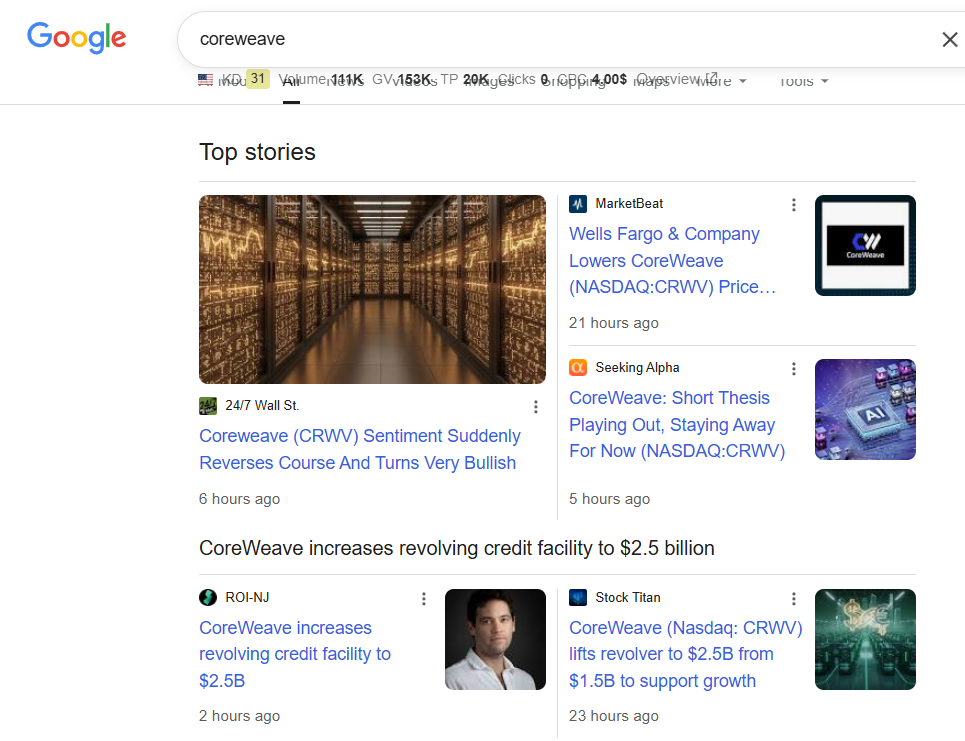
As a writer, you don’t normally add the code, but if you see your clients don’t use it, bring it up!
For blog posts, I recommend the Article and Breadcrumb schema. And List, FAQPage, and HowTo schema whenever relevant.
You can add schema markup automatically with a CMS plugin or by asking your AI assistant to generate it for you based on the page content.
Here’s an example of schema markup for one of my articles created by Gemini.
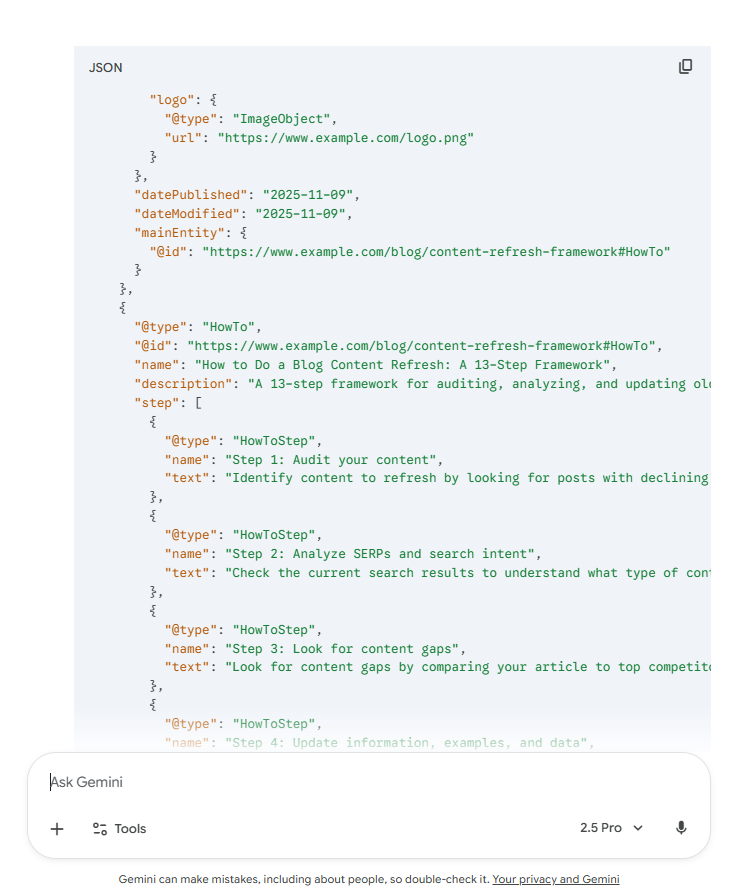
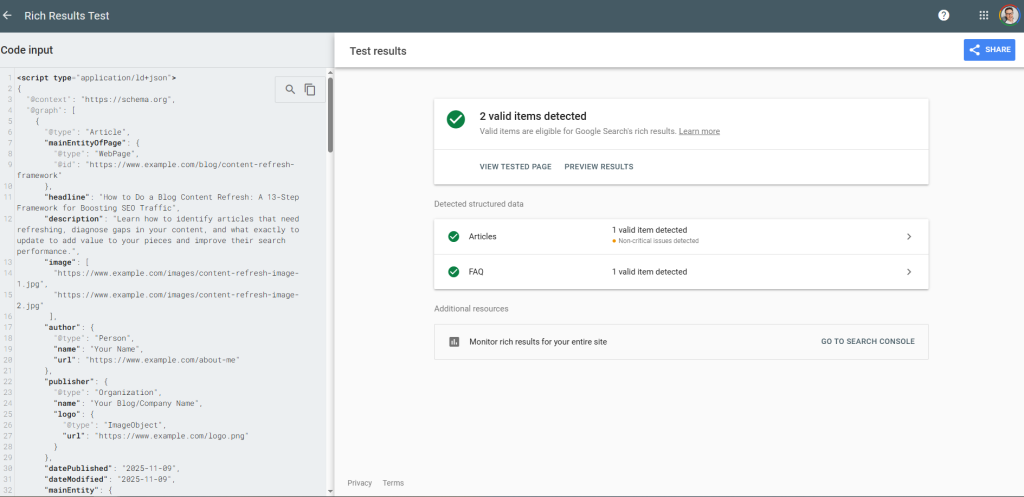
Once ready, validate it in Google’s Rich Results Test to ensure it’s working and paste it on your page as custom HTML.
Skill 4: Identify content that earns backlinks & AI citations
According to NP Digital data, the best link magnets include:
- Free tools (like calculators, domain authority checkers, or route planners)
- Original research reports (because they offer unique insights and data)
- Ultimate guides (because they cover the topic comprehensively, so the reader doesn’t need to search elsewhere)
- Infographics (because they make content more visually pleasing, engaging, and easier to digest)
- List posts (for example, “best x tools for” or “top x alternatives”)
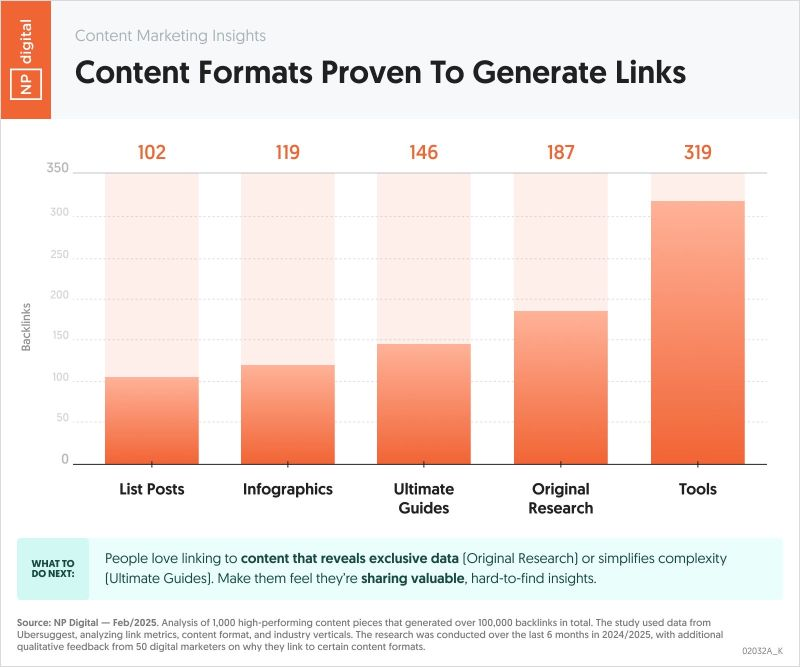
Writers, editors, and website owners link to them because they increase their content value.
This matters because backlinks are still one of the key ranking factors. If high-authority domains link to your page, Google sees it as a reputable source on the topic.
And brand mentions, even unlinked ones, have the biggest impact on AI visibility, according to Ahrefs.
Skill 5: Understand technical SEO & core web vitals
Your amazing content won’t rank if the site is slow, broken, or hard to crawl, so always check it for:
- Core Web Vitals: Does the page load quickly? Is it responsive and visually stable? Pages meeting Google’s Core Web Vitals (LCP<2.5s, INP<200ms, CLS < 0.1) rank better because they offer a better user experience.
- Mobile-friendliness: Is it optimized for mobile screens? Does it support responsive/adaptive web design? 50-60% of web traffic comes from mobile devices (although this varies across niches and jobs to be done).
- Crawlability: Does the site have an XML sitemap submitted to Google Search Console? Does the robots.txt file allow access to search engine bots?
- Security: Does it use HTTPS?
Skill 6: Identify content that needs refreshing and learn how to update it
Google promotes content that’s fresh. So do LLMs.
This makes sense: up-to-date content is more likely to satisfy user needs than a page written a while ago.
There are three main situations when you need to update your content:
- You’re losing rankings, and the traffic is declining
- You’ve updated your product (or your competitors have)
- You haven’t updated it for a year — even if the article is still performing well. (In niches like SaaS, AI, or SEO, things change very quickly, so sometimes monthly updates are necessary to keep the articles up to date)
My content refresh process involves:
- Adapting the piece to any shifts in search intent
- Updating outdated product information, statistics, and visuals
- Expanding the content to include new insights or answer new questions
- Improving its structure and readability
- Optimizing it for organic and AI search
Skill 7: Promote content through different channels
Promoting content across different channels can help it gain momentum, particularly if you’re only starting and have no established audience or high domain authority.
So instead of waiting for readers to discover your content, share it with the world via:
- Social media (share interesting snippets from the article in several posts and add the link in the comments)
- Email newsletter (the people who have signed up voluntarily for your email list are more likely to engage with the content)
- Direct outreach (send the article to people in your network and other writers or journalists in your space who might find it interesting)
- Paid ads
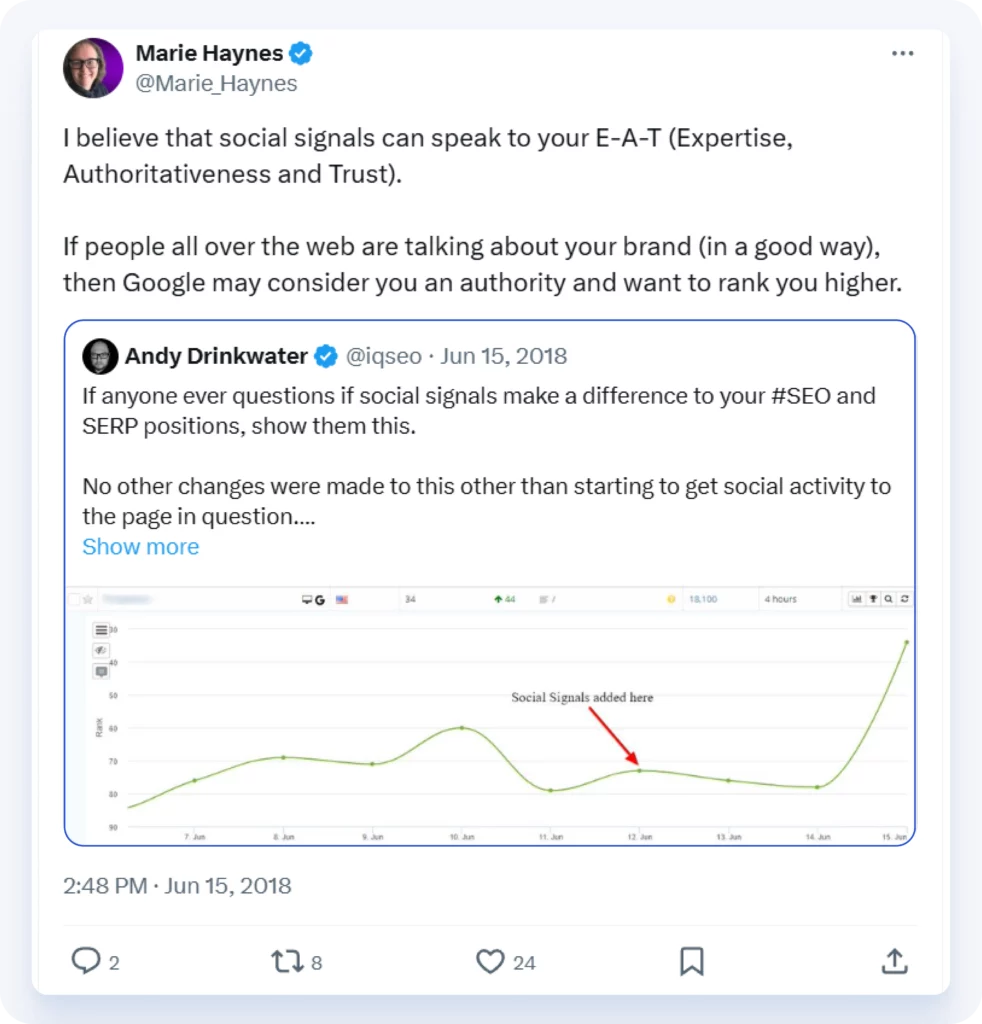
Although Google has stated that social signals (likes or shares) are not a direct ranking factor, they can improve rankings indirectly by amplifying the direct ranking signals:
- Content amplification: Social media gets more “eyeballs” on your content. This drives more qualified traffic to your site.
- Backlink opportunities: The more people see your content (especially on professional platforms like LinkedIn), the more likely a blogger, journalist, or industry expert is to see it and link to it from their site.
- Brand signals: A strong social presence builds brand awareness, which leads to more “branded searches” (e.g., people searching for “My Brand” + “keyword”). Google sees this as a strong signal of authority and trust.
Pro tip: Whenever I use SME insights in my article, they are the first ones to see the copy because they’re likely to share it with their audiences.
Skill 8: Track content performance and optimize accordingly
Tracking your content performance consistently and tweaking it based on the data is key to successful SEO.
Even if you follow all SEO principles religiously, there’s no guarantee your content will perform well in organic search rankings. And even if it does initially, the next Google update can send it down the SERP. Or competitors can leapfrog you.
Here are a few metrics you can track in Google Search Console and Google Analytics to make informed decisions:
- Keyword rankings: The position of the article for its primary keyword. You can use it to detect content decay or identify pages that are within the “striking distance”, for example, in positions #4-10 or 11-20 that you should prioritize for optimizations and updates.
- Impressions: How many people saw it in the SERPs. This tells you if Google finds your content relevant enough to show it to users. Low impressions for high-volume keywords may indicate the article doesn’t satisfy search intent.
- Click-through rate (CTR): The percentage of users who saw the page and clicked. Low CTR = need to optimize the title tag, otherwise Google will downgrade its rankings.
- Traffic: How many people visited the page. The north star metric for measuring the effectiveness of many teams’ SEO efforts.
- Time on page/Average Engagement Time: How long the visitors stay on the page. An indication of their engagement. Aim for 2-4 minutes. If it’s lower than a minute, you’ve got work to do. For example, by improving hooks, increasing scannability, and adding visuals.
- Conversion rate: How many visitors book the demo, sign up for a trial, fill in the contact form, etc. To improve your article’s conversion rates, align the CTAs with the journey stage. For example, “book the demo” is great for BOFU content but not for TOFU articles, because the readers aren’t ready for the purchase at this stage.
Best SEO tools for content writers and strategists
To execute these strategies, you need the right tools. While GSC and GA allow you to track content performance, they aren’t of much use for keyword research or content optimization.
1. Surfer is the best-in-class content optimization platform. It analyzes top-ranking pages to give you real-time recommendations on word count, structure, and keyword usage within its Content Editor. I also love its Topical Maps that show you how well you cover keyword clusters.
2. NeuronWriter is a budget-friendly content optimization tool and a great alternative to Surfer for freelancers who write only a few blog posts a month. Just like Surfer, it uses NLP to analyze competing articles and provide semantic keyword suggestions as you write.
3. Ahrefs is the most popular SEO tool for content strategists and managers. I use the Site Explorer to monitor site performance and general health, Keywords Explorer for keyword research, and Competitive Analysis to find search terms competitors rank for, but my content doesn’t. It also has an AI Content Helper that helps you identify and fill content gaps.

4. Semrush is Ahrefs’ main competitor with very similar SEO features. It’s a more comprehensive marketing platform, but if you use it only for SEO, it works out more expensive than Ahrefs.
Master SEO to future-proof your career
When I started to write SEO content, I assumed all writers had a solid SEO understanding. But that’s not true. Plenty, even some of the best-paid ones, rely a lot on their content strategists and content managers for guidance.
Developing a good SEO understanding, so you can make independent decisions, is your way to stand out.
And will continue to be so. The overlap between SEO and AI Search Optimization is huge, so even if organic search becomes less significant, the same strategies will help you increase online visibility and bring traffic to your website.
Need content that
ranks high in Google?
SEO FAQs
Let’s finish with answers to a few frequently asked questions about SEO.
What is SEO?
SEO stands for search engine optimization, and it’s a discipline focused on improving websites’ rankings in search results to drive organic traffic.
This involves creating valuable content that answers users’ search queries, making it easy for users and search engines to understand your content and easily find relevant information, and establishing your website’s authoritativeness and trustworthiness.
Why is SEO important?
SEO is a valuable customer acquisition channel.
Prospective customers use search engines like Google or Bing to research products and services they need. If your product pages are well optimized for search engine visibility, customers are more likely to find — and choose — them.
Is SEO dead?
No, SEO isn’t dead.
It’s true that AI search is changing how users research products. More and more people use AI assistants to find what they need. And when they use Google, they’re often satisfied with the answers they get from AI Overviews.
This has led to lower CTRs and a drop in organic search traffic, which is making many question the SEO ROI.
However, Google is still the main search engine, accounting for just under 90% of the market share. That’s how most consumers find new products, so SEO still matters.
Moreover, SEO and AI search optimization tactics overlap greatly. And AI search engines pull information from organic search results when they can’t find the answers in their training data. So if your content ranks high in Google, it’s also likely to show in AI answers.
All in all, the return on investment in SEO may be lower — or at least harder to measure — but the channel is alive and kicking.
What is keyword cannibalization?
Keyword cannibalization happens when you have multiple pages on your website competing for the same keyword and the same search intent. In short, you’re competing against yourself.
This is a problem because it confuses search engines. Google can’t figure out which page is the “main” one, so it may not rank either of them highly.
To fix it, you’d typically consolidate the competing articles into one single, comprehensive page. Then, I use 301 redirects to send all the traffic from the old, weaker pages to the new one.
Having said that, it’s unavoidable for multiple pages to rank for the same keywords, especially if you have a lot of content fully covering your content clusters.
Should I use paid ads to promote my blog posts?
Paid ads (like Google Ads or paid search) do not directly improve your organic SEO rankings. That said, many teams successfully use paid ads alongside an SEO campaign.
Just like social media, they can get your content in front of more people, drive qualified referral traffic, and help you establish yourself as a reliable source in your niche.
This will improve your site’s organic results in the long run.
