

Your blog has 500 posts. Maybe 50 of them still drive traffic. The rest? Slowly decaying in the SERPs while you keep publishing new content that takes months to rank.
Refreshing content at scale fixes this problem, but most teams get stuck on the “at scale” part. They know how to update one post. They don’t know how to systematically refresh dozens or hundreds without breaking what’s already working.
This guide covers how to audit and prioritize a large content library, refresh posts without losing rankings or backlinks, and build a repeatable system that grows with your blog.
Key takeaways for refreshing blog content at scale
- Refreshing blog content at scale starts with auditing your content using Google Search Console and Semrush to find underperforming posts, then updating data, improving SEO elements, and enhancing visuals in batches.
- Prioritize posts with high impressions but low clicks, or posts ranking on page two or three for valuable keywords.
- Preserve the URL and core topic to maintain existing authority and backlinks.
- AI tools speed up the editing process, but human oversight keeps quality and accuracy intact.
- Track organic traffic, keyword rankings, and conversions at 30, 60, and 90 days to measure success.
What is a content refresh?
A content refresh updates an existing blog post to improve its search rankings, accuracy, and relevance. You’re not starting from scratch. Instead, you’re making targeted changes to specific elements of a post that’s already indexed.
The distinction matters:
- Content refresh: Targeted updates to statistics, examples, links, and formatting while keeping the core structure.
- Full rewrite: Rebuilding the post from the ground up with fresh research and a new approach. Needed when the user intent shifts.
Why refreshing content beats creating new posts
Refreshing existing content delivers better ROI than creating new posts because you’re building on assets you’ve already earned. New posts start at zero.
Refreshed content preserves existing authority and backlinks
Backlinks pointing to your old post took months or years to accumulate. And might have cost you thousands of $$$.
A refresh keeps them intact. A new post on the same topic means starting the link-building process over again.
Google rewards freshness with improved rankings
Google’s algorithm uses freshness signals to determine relevance. Updating your content tells Google the information is current, which can boost rankings for time-sensitive topics.
Refreshes take less time than new content creation
The core structure and foundational research already exist. You’re optimizing and improving, not building from nothing. A refresh that takes three hours might replace a new post that would take eight.
Updated content performs better in AI search
Refreshed content with current data is more likely to be cited in AI-generated answers.
LLMs and AI Overviews favor recent, accurate information. AirOps data shows over 35% of pages cited by ChatGPT were updated within the last three months.

How to audit a large blog and find posts that need refreshing
Scaling content refreshes starts with a systematic audit. You can’t refresh everything at once, so you need a process to identify which posts offer the best opportunity.
1. Use traffic decay data to spot declining posts
Traffic decay is the gradual loss of organic traffic over time.
In Google Search Console, look for posts losing impressions and clicks month over month. A steady decline signals the content is becoming outdated.
Dramatic traffic drops coinciding with the Google Core Updates affecting certain kinds of pages can also indicate the need to update the content. A good example is the recent “crackdown” on listicles.
However, such pages normally need a rewrite rather than a refresh to pick up again.
2. Identify pages slipping in rankings
Rankings are a more accurate way to spot content decay than traffic.
A page can lose traffic for various reasons. For example, AI Overviews can reduce clicks on the first page by 19.4-48% according to the latest Ahrefs data.
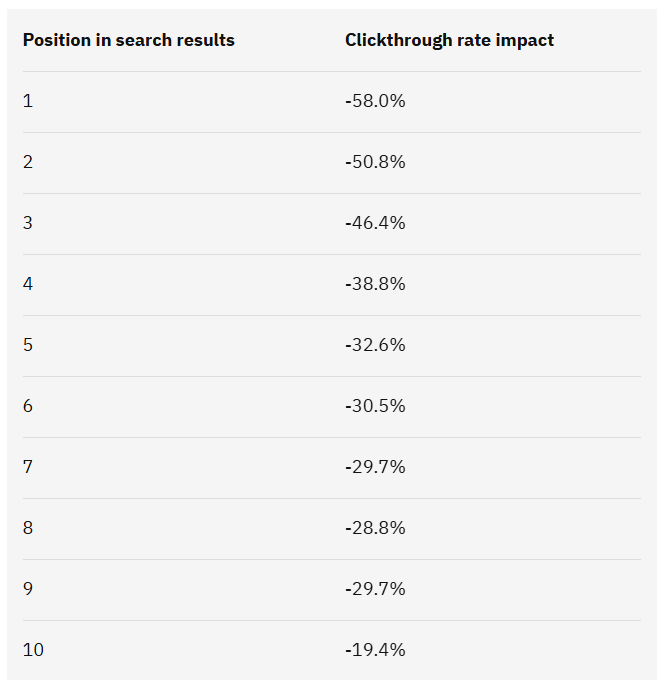
Rankings are more stable. If the page is dropping in rankings for its primary keywords, it might be time to refresh it.
3. Filter for posts older than 12 months with ranking potential
Focus on posts over a year old that still hold some keyword rankings.
As you’ve seen above, pages updated within the last year have higher AI search visibility, so refreshing posts that are 12+ months old can bring them to the top of the pile.
Posts with no ranking potential at all may not be worth the effort. Also, pages updated within the last 3 months aren’t likely to benefit.
4. Monitor competitor products for updates
Product updates are another factor that necessitates content refreshes.
When you update your product — or your competitors do — update relevant assets, like listicles or comparison pages, even if they still rank well.
When visitors — and LLM bots — come across your page, they must get accurate info about your product capabilities or pricing. Providing inaccurate competitor details can also hurt your credibility.
5. Build a refresh backlog in a spreadsheet or project tool
Create a centralized tracker in Notion, Airtable, or Google Sheets. Log all posts identified for refresh along with their priority scores, status, and last refresh date.
| Column | Purpose |
|---|---|
| URL | Post to refresh |
| Primary keyword | Target term |
| Content type | TOFU, MOFU, BOFU |
| Current ranking + trend | Position in SERPs |
| Traffic trend | Increasing, stable, or declining |
| Priority score | High, medium, low – or a numerical value |
| Status | To do, in progress, done |
How to prioritize hundreds of blog posts for refresh
Not every post deserves a refresh. A scoring system based on traffic potential, business value, and effort helps you focus where the impact will be greatest.
Target posts ranking positions 4 through 20 for quick wins
Posts ranking just off the first page have the best refresh ROI. They already have authority. Small, targeted improvements can push them into the top three positions where most clicks happen.
Focus on BOFU pages that drive revenue
Give top priority to bottom-of-the-funnel content like comparison posts, product-focused listicles, and case studies. Refreshing these first keeps your most valuable content effective.
Deprioritize posts with no search demand or strategic value
Some posts aren’t worth saving. If an article targets a keyword with no search volume and serves no strategic purpose, consider pruning (deleting) the content instead.
Score posts to refresh based on traffic potential, value, effort, and difficulty
In addition to rankings and conversions, consider:
- Traffic potential: The traffic it can bring based on the search volume of the keywords it’s ranking for
- Business value: The post’s ability to drive conversions or support sales. High-converting pages are higher-priority than low-converting ones.
- Effort required: The scope of updates needed, from minor tweaks to major additions.
- Difficulty: Based on how strong the competitors’ pages are and how likely you are to boost rankings or traffic.
How to refresh content without hurting existing rankings
A poorly executed refresh can tank your rankings. The key is preserving what works while improving what doesn’t.
Preserve the URL and never change the slug
Your post’s URL is its permanent address. Changing it breaks all existing backlinks and resets ranking signals. Keep the existing URL structure intact.
Keep the core topic and primary keyword intact
A refresh enhances an article. It doesn’t pivot its focus. If your post ranks for “email marketing tools,” don’t shift it to “marketing automation platforms.”
Update incrementally instead of rewriting everything
Avoid gutting the entire post at once. Make targeted changes to outdated sections, statistics, or examples. This approach is safer and reduces the risk of ranking fluctuations.
Monitor rankings for 2 to 4 weeks after publishing
Track keyword positions closely after publishing. Some fluctuations are normal immediately after an update. Consistent monitoring lets you catch and address unexpected drops early.
How to maintain backlinks during a content refresh
Your backlinks pass authority to your page. A careless refresh can destroy their value.
Audit existing backlinks before making changes
Before touching the content, use Ahrefs, Semrush, or Moz to see which external sites link to your post. This tells you which sections are most valuable to protect.
Keep anchor text targets and linked sections intact
If an external site links to a specific heading or quote, don’t delete or significantly alter that section. Preserving the content that earned backlinks ensures the links remain relevant.
Set up redirects if you consolidate or restructure pages
If you merge multiple posts or change a URL structure, implement a 301 redirect from the old URL to the new one. This passes most of the link equity to the new page.
How to use AI tools to scale content refreshes
AI can accelerate the refresh process, but human oversight keeps quality intact. Use AI as an assistant, not a replacement.
Use AI workflows to prioritize updates
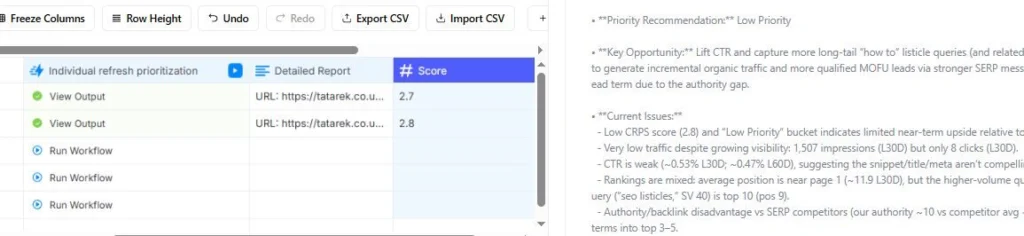
AI workflows can help you prioritize blog posts based on multiple data points.
As mentioned, various factors affect refresh urgency. Some are more important than others, but they all matter. And trying to analyze all the data points consistently across a large content library isn’t feasible.
That’s why I’ve built an AI workflow that scores pages across multiple dimensions and calculates the overall Content Refresh Priority Score (CRPS). It also generates a detailed rationale.
Gather up-to-date information about competitors
In some niches, you might be competing against multiple competitors. Keeping tabs on all their updates, releases, or pricing changes isn’t feasible for small teams.
To tackle the challenge, I’ve built a sequence of workflows that gather information about competitors from multiple sources. Their pricing pages, feature pages, release notes, support docs, Reddit, reviews, and YouTube, to name just a few. And save it all in a database.
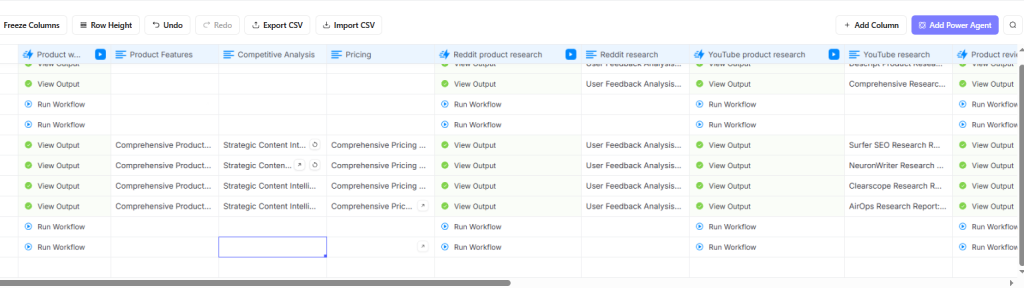
Another one scans articles — listicles and X vs Y comparison blogs — for product mentions and compares the information in the article with the database entries to identify info that may need updating.
Identify content gaps and missing subtopics with AI
Feed your existing post and top-ranking competitor articles into an AI tool. Ask it to identify topics your competitors cover that you don’t.
Better yet, search Reddit threads and analyze them for topics and Redditor questions that competitors don’t address in their content.
This is a fast way to find content gaps.
Optimize for organic and AI search
With the right prompts and templates, AI can easily identify opportunities to improve organic and AI search visibility.
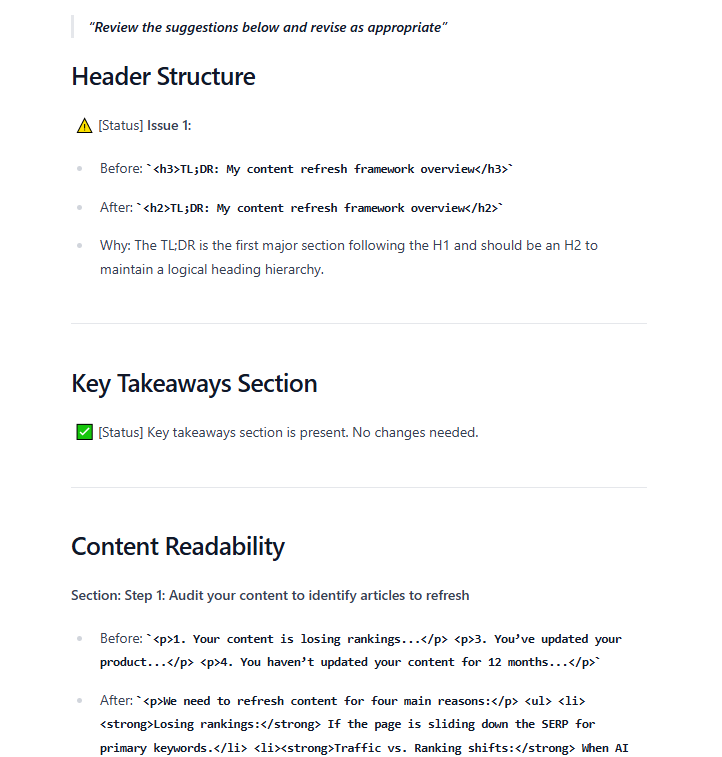
AirOps has an off-the-shelf workflow that analyzes the articles and suggests changes, which it can also implement.
Here’s what the report looks like.
Create briefs for writers
Even when you want human writers to conduct the updates, AI can help you create the briefs for them.
For example, based on the content gap and SEO/GEO analysis or product update research results.
Generate updates drafts
Use AI tools to quickly generate updated statistics or suggest fresh examples.
Always verify the accuracy of AI-generated data before publishing.
Review and edit AI output for accuracy and brand voice
Never publish raw AI-generated content. Every piece of AI output requires human review for factual accuracy and tone alignment.
But AI can actually help you with the review — I use it regularly to edit my content.
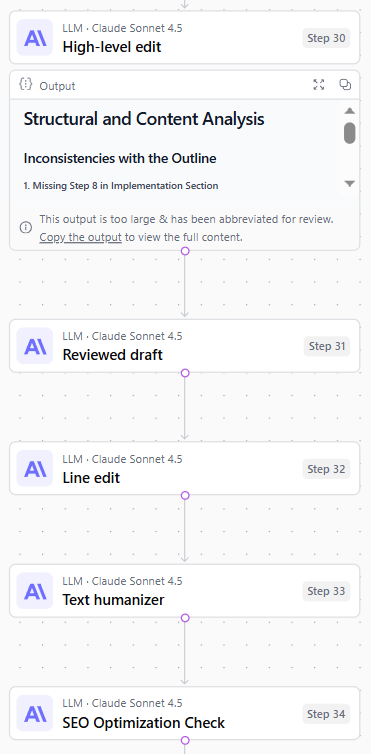
AI is actually pretty good at checking stats and data, even if it isn’t good at producing reliable research results in the first place. However, I never trust it and check all figures manually.
Content refresh checklist for each post
Follow this checklist for every post to keep your refresh process consistent:
- Align with search intent: Make sure the format and content are consistent with top-ranking articles.
- Update outdated statistics: Replace old data with current figures and cite your sources.
- Add new keywords: Incorporate related keywords and semantic terms naturally into headings and body copy.
- Refresh internal and external links: Fix broken links and add new internal links to recent content.
- Improve formatting: Break up long text with shorter paragraphs, bullet points, and new subheadings.
- Update the title and meta description: Refresh the title tag to improve CTR, often by adding the current year.
- Revise the introduction and conclusion: Rewrite the intro to hook readers and update the CTA to align with current goals.
- Add new visuals: Add up-to-date screenshots, infographics, and videos for better readability and engagement.
- Change ‘last modified’ dates: Make sure the data visitors see is up-to-date.
How to measure content refresh success
Track specific metrics to prove ROI and refine your process over time.
Track organic traffic changes at 30, 60, and 90 days
Compare the post’s organic traffic before and after the refresh. Look for a sustained upward trend, not just early fluctuations.
Monitor keyword ranking movements for target terms
Use a rank tracking tool to monitor whether primary and secondary keywords are improving their positions.
Assess conversion impact for bottom-funnel content
For BOFU content, track direct business impact. Measure whether the refresh leads to more demo requests, free trial signups, or conversions.
Build a repeatable content refresh system that scales with your blog
A one-time refresh campaign isn’t a long-term strategy. To maintain performance as your blog grows, you need a system that runs continuously.
Set a recurring audit cadence, whether quarterly or semi-annually. Assign clear ownership for the process and create standard operating procedures for your team. Batching similar tasks, like updating all posts in a single topic cluster, creates efficiencies.
If you’re looking for a writer to help you with your content refreshes, or if you would like me to help you build AI workflows for updates, get in touch.
FAQs about scaling content refreshes
How many blog posts can one person refresh per month?
The number depends on the depth of the refresh and post length. A skilled writer focused on targeted updates rather than full rewrites can handle several posts per week.
What is the difference between a content refresh and a full rewrite?
A content refresh updates specific elements like data, examples, and links while preserving the core structure and URL. A full rewrite rebuilds the post from scratch with new research and a new angle.
How often should I refresh the same piece of content?
Most evergreen content benefits from a refresh every 6 to 12 months. High-priority posts in fast-changing industries may need attention every quarter, or even more often.
Do I need to notify Google after refreshing a blog post?
You don’t need to manually notify Google, as its crawlers will eventually find the update.
However, requesting re-indexing in Google Search Console can speed up the process, and I always do this.
